
⚡ Quick Verdict
Bottom Line: Matter is the easiest smart home standard ever made — once you have the right hub and know which platform to use. This guide walks you through everything step by step, even if you have zero smart home experience.
Best Starting Point: Pick an Amazon Echo (4th Gen or newer) as your first hub — it supports Matter and Thread out of the box, works with Alexa, and costs under $50 on sale.
Time to Set Up Your First Device: 5–10 minutes once your hub is ready.
What Is Matter — And Why Does It Make Your Life Easier?
If you’ve been confused by smart home gadgets that only work with certain apps, or devices that stop working when you switch from Alexa to Google Home — Matter is the solution to all of that.
Matter is an open connectivity standard for smart home devices. It was developed by the Connectivity Standards Alliance (CSA) and is backed by Apple, Google, Amazon, and Samsung. In plain English: it’s a universal language that lets smart home devices from different brands talk to each other — and work with any platform you prefer.
Before Matter, a smart bulb from Brand A might only work with Alexa. After Matter, that same bulb works with Alexa, Apple Home, Google Home, and SmartThings — all at once. You’re no longer locked into one ecosystem.
💡 Pro Tip: Matter runs over your existing WiFi and Thread network — no proprietary hubs from each brand required. One good Matter-compatible controller runs everything.
The 3 Key Things Matter Gives You
- Interoperability: Devices from any brand work together
- Multi-admin: Control your devices with multiple apps simultaneously (e.g., both Alexa and Apple Home)
- Local control: Most commands run locally on your network — faster response and no cloud outages
What Hardware Do You Need to Get Started?
To set up a Matter smart home, you need just two things:
- A Matter controller (hub) — This is the brain. It manages your devices and connects them to your chosen app.
- Matter-compatible devices — Smart bulbs, locks, thermostats, sensors, etc. that carry the Matter certification logo.
Understanding Matter Controllers
Your smartphone (iPhone or Android) can act as a temporary Matter commissioner to pair new devices — but for day-to-day control, you need a persistent controller that stays online 24/7. This is usually a smart speaker, smart display, or dedicated hub.
For the best experience, look for a controller that also includes a Thread Border Router. Thread is a low-power mesh networking protocol used by many Matter devices (sensors, locks, switches). Without a Thread border router, Thread-based devices can’t reach your network. For more detail, see our full Matter WiFi vs Thread comparison guide.
Which Hub Should a Beginner Buy?
Here are the four most popular Matter controllers for US beginners in 2026, compared side by side:
| Hub | Platform | Thread | Price | Best For |
|---|---|---|---|---|
| Amazon Echo (4th Gen) | Alexa | ✓ Yes | ~$99 ($49 on sale) | Best all-around beginner hub |
| Apple HomePod mini | Apple Home + Siri | ✓ Yes | ~$99 | Apple users / iPhone households |
| Google Nest Hub (2nd Gen) | Google Home | ✓ Yes | ~$99 | Android/Google users |
| Samsung SmartThings Station | SmartThings | ✓ Yes | ~$70–$99 | Multi-protocol (Zigbee + Thread + Matter) |
Our Top Pick for Beginners: Amazon Echo (4th Gen)
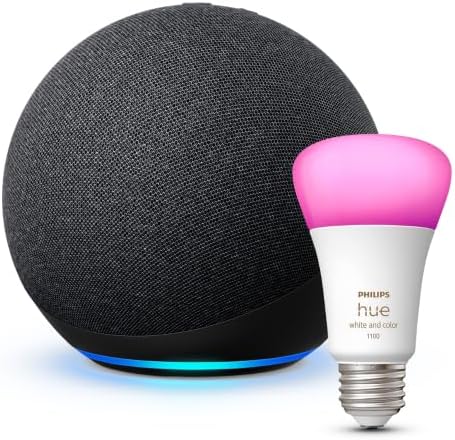
The Amazon Echo (4th Gen) is our top recommendation for anyone just getting started with Matter. It supports Matter natively, includes a Thread border router, and works with Alexa — one of the most capable voice assistants for smart home control. It’s widely available, goes on sale frequently, and has the largest library of compatible Matter routines and automations.
- ✅ Built-in Thread border router
- ✅ Works as a Matter controller out of the box
- ✅ Alexa routines are powerful and easy to create
- ✅ Frequently discounted to $49 or less
- ❌ Requires Amazon account
- ❌ No touchscreen (consider the Echo Show 10 if you want a display)
For a deeper dive on all options, see our full best Matter hubs 2026 guide.
Step-by-Step: How to Set Up Your Matter Smart Home
💡 Before You Start: Make sure your home WiFi is 2.4 GHz or 5 GHz (both work). You’ll need a smartphone running iOS 16.2+ or Android 8.1+. Have your WiFi password ready.
Step 1: Choose Your Platform
Your platform determines which app you’ll use to control everything. Pick based on what devices and ecosystem you already use:
- Mostly Apple/iPhone household? → Use Apple Home
- Android/Google users? → Use Google Home
- Already have Alexa devices? → Stick with Alexa
- Want maximum device compatibility? → SmartThings
Not sure? See our full Alexa vs Apple Home vs Google Home comparison guide.
Step 2: Set Up Your Hub / Controller
Plug in your hub (Echo, HomePod mini, Nest Hub, or SmartThings Station) and follow the initial setup in its companion app. Make sure it is:
- Connected to your WiFi network
- Fully updated to the latest firmware
- Signed in to your account (Amazon/Apple/Google/Samsung)
The hub will automatically function as your Matter controller once set up. You do not need to enable anything special — Matter support is built in.
Step 3: Buy a Matter-Certified Device
When buying a new smart device, look for the Matter certification logo on the box — a stylized “M” with connectivity arcs. Common starter devices for beginners:
- Smart bulbs — easiest to set up, great first device (see our best Matter smart lights guide)
- Smart plugs — plug in and control any appliance
- Smart locks — upgrade your front door (see our best Matter smart locks guide)
Step 4: Open Your Smart Home App
Open the app for your chosen platform:
- Alexa: Amazon Alexa app (iOS/Android)
- Apple Home: Home app (built into iPhone)
- Google Home: Google Home app (iOS/Android)
- SmartThings: SmartThings app (iOS/Android)
Step 5: Scan the Matter QR Code
Locate the Matter QR code on your new device — it’s usually on a sticker on the device itself or in the box. In your app:
- Alexa: Tap Devices → + → Add Device → scan QR code
- Apple Home: Tap + → Add Accessory → point camera at QR code
- Google Home: Tap + → Set up device → New device → scan QR code
- SmartThings: Tap + → Add → By QR code → scan QR code
Your phone will automatically connect to the device via Bluetooth LE for initial commissioning, then hand it off to your WiFi or Thread network. The whole process takes about 60 seconds.
Step 6: Name Your Device and Assign a Room
Once paired, give your device a clear name (e.g., “Living Room Lamp”, “Front Door Lock”) and assign it to a room in the app. This makes voice commands and automations much more intuitive.
Step 7: Set Up Your First Automation
Now the magic happens. In your app, create a simple automation to see Matter in action:
- Example: “Turn on living room lights when I arrive home”
- Example: “Turn off all lights at midnight”
- Example: “Set thermostat to 68°F at 6am on weekdays”
All platforms support location-based and time-based automations. SmartThings and Home Assistant offer the most advanced options if you want to go deeper later.
Step 8: Add More Devices (And Enable Multi-Admin)
One of Matter’s best features is multi-admin — you can add the same device to multiple platforms simultaneously. For example, your Matter smart lock can live in both Alexa AND Apple Home at the same time, controlled from either app or voice assistant.
To add a device to a second platform, simply go through the “Add Device” flow again in the second app. The device will ask if you want to allow additional controllers — approve it, and you’re done.
5 Common Beginner Mistakes to Avoid
Mistake 1: Buying Non-Matter Devices
Not all smart home devices are Matter-compatible. Always check for the Matter logo on the box before purchasing. A device labeled “Works with Alexa” or “Works with Google Home” is NOT necessarily Matter-certified. When in doubt, search for the exact model number on the CSA’s official Matter certified products list.
Mistake 2: Skipping the Thread Border Router
If you’re buying Thread-based devices (sensors, door locks, switches), you need a Thread border router in your home. Most modern Matter hubs include one built in. Without it, Thread devices will fail to connect or have unreliable performance. Check our WiFi vs Thread guide to understand which type of device you’re buying.
Mistake 3: Not Updating Firmware Before Pairing
Many Matter devices ship with outdated firmware that must be updated before they can be commissioned. If your device is brand new and refuses to pair, connect it to its manufacturer’s app first, let it update, then try adding it to your main Matter platform. If you see a commissioning error, see our Matter commissioning failed fix guide.
Mistake 4: Using a 5 GHz-Only WiFi Network for Thread Devices
Thread uses a separate radio band and doesn’t care about your WiFi frequency — but your Matter controller does need stable 2.4 GHz or 5 GHz connectivity. If you’re having pairing issues, temporarily move closer to your router during commissioning.
Mistake 5: Not Naming Devices Clearly From the Start
Voice commands like “Alexa, turn on the light” don’t work well if you have 10 devices named “Light 1” through “Light 10”. Name devices specifically from day one (“Bedroom Ceiling Light”, “Kitchen Counter Plug”) — it’s much easier to do at setup than to rename later.
Frequently Asked Questions
Do I need a hub to use Matter smart home devices?
Technically, your smartphone can commission (pair) a Matter device directly via Bluetooth LE. However, for reliable day-to-day control and automation, you need a persistent Matter controller — a smart speaker, display, or dedicated hub — that stays online 24/7. Most Amazon Echo, Apple HomePod mini, and Google Nest Hub devices already function as Matter controllers.
Can I control my Matter devices with more than one platform at the same time?
Yes — this is one of Matter’s best features, called multi-admin. You can add the same Matter device to both Alexa AND Apple Home simultaneously. Each platform controls the device independently. This means you can use Alexa for voice commands and Apple Home for automations — on the exact same device.
What is the difference between a Matter WiFi device and a Matter Thread device?
Matter WiFi devices connect directly to your home WiFi router — similar to how your phone connects. Matter Thread devices use a separate low-power mesh network (Thread) and require a Thread border router in your home (most modern smart speakers include one). Thread devices have lower power consumption and better range in large homes. For most beginners, starting with WiFi-based Matter devices is simpler. See our full WiFi vs Thread guide for details.
Which smart home platform should I choose as a beginner?
For most US households, Alexa is the easiest starting point — the Alexa app is intuitive, Echo devices are affordable and widely available, and the automation features are excellent for beginners. Apple Home is ideal if your household is all-iPhone. Google Home is a great choice for Android-heavy households. All three fully support Matter. See our detailed platform comparison guide for a head-to-head breakdown.
Why won’t my Matter device show up in the app after scanning the QR code?
The most common causes are: (1) the device needs a firmware update first — pair it with its manufacturer’s own app to update, then retry; (2) you’re too far from your WiFi router during commissioning — move closer; (3) your network is blocking mDNS traffic — some routers need specific settings. See our full commissioning failed fix guide for step-by-step solutions.
Are all smart home devices compatible with Matter?
No — Matter certification is opt-in for manufacturers. Always look for the official Matter logo (a stylized M with connectivity arcs) on the product box before purchasing. Older WiFi or Zigbee devices are NOT automatically Matter-compatible unless the manufacturer has released a Matter firmware update. Check the CSA’s official certified products list when in doubt.
Final Thoughts: Getting Started Is Easier Than You Think
Setting up a Matter smart home as a beginner is genuinely simpler than it was just two years ago. The standard has matured, the device library has grown to thousands of products, and the major platforms — Alexa, Apple Home, Google Home, SmartThings — all support Matter natively in their current apps.
The fastest path to your first working Matter smart home:
- Pick up an Amazon Echo (4th Gen) as your hub — it’s the most beginner-friendly at the best price point
- Choose one simple first device — a Matter smart bulb is the easiest starting point
- Scan the QR code in the Alexa app — you’ll be up and running in under 10 minutes
- Expand from there — add a smart lock, a smart thermostat, or sensors as your confidence grows